Integrating Floral Portrait Backgrounds into Professional Creative Workflows
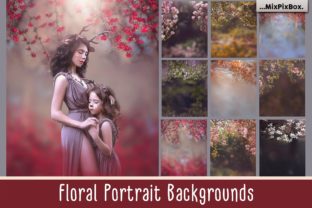
High-resolution floral portrait backgrounds serve as a foundational asset in modern digital design, bridging the gap between organic aesthetics and professional polish. For photographers, graphic designers, and content creators, these assets are not merely decorative overlays; they are strategic tools used to elevate visual storytelling, maintain brand consistency, and streamline production timelines. When utilizing a collection of nine high-quality JPG backgrounds sized at 4857 x 6000 pixels, the focus shifts from simple image manipulation to comprehensive workflow integration. Understanding how to leverage these specific technical specifications ensures that the final output meets industry standards for both digital display and large-format printing.
Technical Specifications and Print Readiness
The primary advantage of working with files dimensioned at 4857 x 6000 pixels is the assurance of print fidelity. At 300 DPI (dots per inch), these dimensions translate directly to a 16x20 inch print size without interpolation or quality loss. This specification is critical for professionals who must deliver physical products alongside digital assets. In a commercial workflow, this resolution allows for significant cropping flexibility. A designer can isolate a specific floral cluster for a social media graphic or utilize the full canvas for a gallery wrap, all while maintaining the sharpness required for professional publication.
When planning a project, verify that your output requirements align with these native dimensions. While upscaling is possible with modern AI tools, starting with a native 300 DPI file eliminates artifacts and preserves the delicate texture of petal details and stem structures. For web-only projects, these high-resolution masters serve as archival source files. You can generate optimized derivatives for various platforms while retaining the original high-fidelity asset for future print campaigns or licensing opportunities. This forward-thinking approach to asset management prevents the need to repurchase or recreate backgrounds when client requirements expand from digital to physical media.
Software Compatibility and Layer Management
Seamless integration depends heavily on software compatibility. These floral portrait backgrounds are designed to function within any layer-based editing environment, including Adobe Photoshop, Photoshop Elements, and Paint Shop Pro. The ability to work with layers is non-negotiable for professional compositing. Layers allow you to adjust blending modes, apply masks, and modify color grading non-destructively. Without layer support, a background becomes a static backdrop rather than a dynamic design element.
A Critical Note for Lightroom Users: Adobe Lightroom Classic and CC are primarily parametric editors designed for global and local adjustments to single images. They do not natively support the pixel-layer compositing required to blend a subject seamlessly into a new floral background. If your primary workflow resides in Lightroom, you must ensure you have a plugin installed that enables layer functionality, or you must adopt a round-trip workflow where the image is sent to Photoshop for compositing and returned to Lightroom for final grading. Attempting to force composite work without proper layer architecture often results in flat, unconvincing edits that lack depth and dimensional integration.
Essential Skills for Implementation
Successful utilization of these assets requires basic proficiency in Adobe Photoshop or equivalent software. Specifically, users should be comfortable with the following core competencies:
- Layer Masking: Essential for revealing the subject while hiding the original background. Precision masking around hair and translucent fabrics is what separates professional composites from amateur cutouts.
- Blending Modes: Understanding how Multiply, Screen, Overlay, and Soft Light interact allows the floral elements to wrap around the subject naturally rather than sitting on top of them.
- Color Matching: Using Curves, Levels, or Selective Color adjustment layers to harmonize the subject’s lighting and temperature with the floral background.
- Smart Objects: Converting background layers to Smart Objects preserves the original 4857 x 6000px data, allowing for non-destructive scaling and filter application.
If you are managing a team or outsourcing post-production, ensure that all operators possess these fundamental skills. Providing a standardized style guide or preset package can help maintain consistency across different editors using the same floral assets.
Workflow Integration: Pre-Production to Post
Floral portrait backgrounds influence decisions at every stage of the creative process. Integrating them effectively requires looking beyond the post-production phase.
Pre-Production Planning
Before the camera shutter clicks, review the available floral backgrounds to inform lighting and wardrobe choices. If the selected backgrounds feature cool-toned hydrangeas or eucalyptus, plan for complementary lighting gels or neutral clothing tones that will grade easily against those colors. Conversely, warm peony or rose backgrounds may require softer, warmer key lighting to prevent color clash. Knowing your background assets in advance allows you to shoot with the composite in mind, ensuring that shadow direction and focal length match the perspective implied by the floral arrangement.
During the Shoot
While shooting, use the floral backgrounds as a reference for posing and negative space. Since these files are portrait-oriented (16x20 ratio), frame your subject to leave adequate headroom and side margins for the botanical elements. Tethered shooting can be particularly beneficial here; displaying the target background on a secondary monitor helps visualize the final composition in real-time. This reduces guesswork and minimizes the risk of cropping too tightly, which would compromise the high-resolution advantage during editing.
Post-Production Execution
In the editing phase, treat the floral background as an active participant in the image hierarchy. Rather than simply placing the subject over the flowers, use the background to guide the viewer’s eye. Blur peripheral floral elements using lens blur filters to simulate shallow depth of field, keeping the sharpest flowers near the subject’s face or hands to create a natural frame. Adjust the background’s contrast and saturation independently of the subject to ensure the portrait remains the focal point. The goal is cohesion; the viewer should believe the subject was photographed in a garden, not pasted onto one.
Asset Organization and Licensing Compliance
Efficient workflows rely on organized digital asset management. With nine distinct high-resolution files, establish a clear naming convention and folder structure. Tag files with descriptive metadata such as flower type, color palette, mood, and orientation. This reduces search time during active projects and facilitates quick retrieval for repeat clients or seasonal campaigns.
Equally important is understanding the licensing terms associated with Shutterstock-sourced imagery. These floral portrait backgrounds are derived from licensed stock photography, which carries specific usage rights. For freelancers and small business owners, verify whether your license covers commercial use, client work, or print-on-demand products. Standard licenses typically cover most editorial and commercial applications, but extended licenses may be required for merchandise resale or high-volume print runs. Maintaining a record of license certificates and source URLs protects your business from copyright disputes and ensures ethical usage. Always attribute sources internally even if public attribution is not required, as this supports audit trails and future re-licensing needs.
Quality Control and Consistency
When deploying floral portrait backgrounds across a series of images—such as a wedding gallery, branding package, or educational course—consistency is paramount. Create action scripts or adjustment layer presets that standardize the treatment of these backgrounds. This might include a specific color balance curve, a uniform vignette, or a consistent grain overlay that ties the disparate elements together.
Implement a quality control checklist before final delivery. Verify that edges are clean, color casts are neutralized, and resolution matches the intended output. Zoom to 100% to inspect transition zones between subject and background. Check that the 300 DPI specification has been maintained throughout the export process. For digital outputs, confirm that file sizes are optimized without introducing compression artifacts that degrade the floral textures. This rigorous attention to detail ensures that the floral portrait backgrounds enhance rather than detract from the professional value of your work.
Long-Term Value and Versatility
Investing time in mastering these specific floral assets yields compounding returns. Because they are high-resolution and versatile, they can be repurposed across multiple verticals. A background used for a spring wedding portfolio can be color-graded differently for autumn lifestyle branding or desaturated for minimalist editorial layouts. The 16x20 aspect ratio also makes them suitable for standard frame sizes, simplifying product offerings for print sales.
For educators and content creators, these backgrounds provide a consistent visual identity for slide decks, worksheets, and video thumbnails. The organic nature of floral designs softens technical content, making it more approachable without sacrificing professionalism. By treating these JPG files as modular design components rather than single-use decorations, you maximize ROI and build a recognizable aesthetic signature. Ultimately, the successful integration of floral portrait backgrounds lies in respecting their technical parameters, mastering the necessary software skills, and embedding them thoughtfully into every stage of the creative workflow.